What is SAML? Understanding Single Sign-On Authentication
Learn how SAML enables single sign-on authentication across enterprise applications, and understand its security architecture.
Single Sign-On (SSO) has become a cornerstone of enterprise authentication, allowing users to access multiple applications with a single set of credentials. At the heart of many SSO implementations is SAML (Security Assertion Markup Language), an XML-based standard that has been enabling federated authentication for over two decades. Understanding how SAML works is essential for anyone involved in enterprise security, especially given recent vulnerabilities like the Fortinet FortiCloudFortiCloud📖Fortinet's cloud-based management and services platform that provides centralized management, logging, reporting, and single sign-on capabilities for Fortinet security products. SSO authentication bypassAuthentication Bypass📖A security vulnerabilityVulnerability🛡️A weakness in software, hardware, or processes that can be exploited by attackers to gain unauthorized access or cause harm. that allows an attacker to circumvent the login verification process and gain unauthorized access to a system without providing valid credentials. that demonstrate what can go wrong when SAML implementations have flaws.
In this comprehensive guide, you will learn what SAML is, how the authentication flow works, the critical role of cryptographic signatures, and the security considerations organizations must address. Whether you are implementing SAML in your organization, evaluating SSO solutions, or responding to SAML-related security advisories, this article will give you the foundational knowledge you need.
What is SAML?
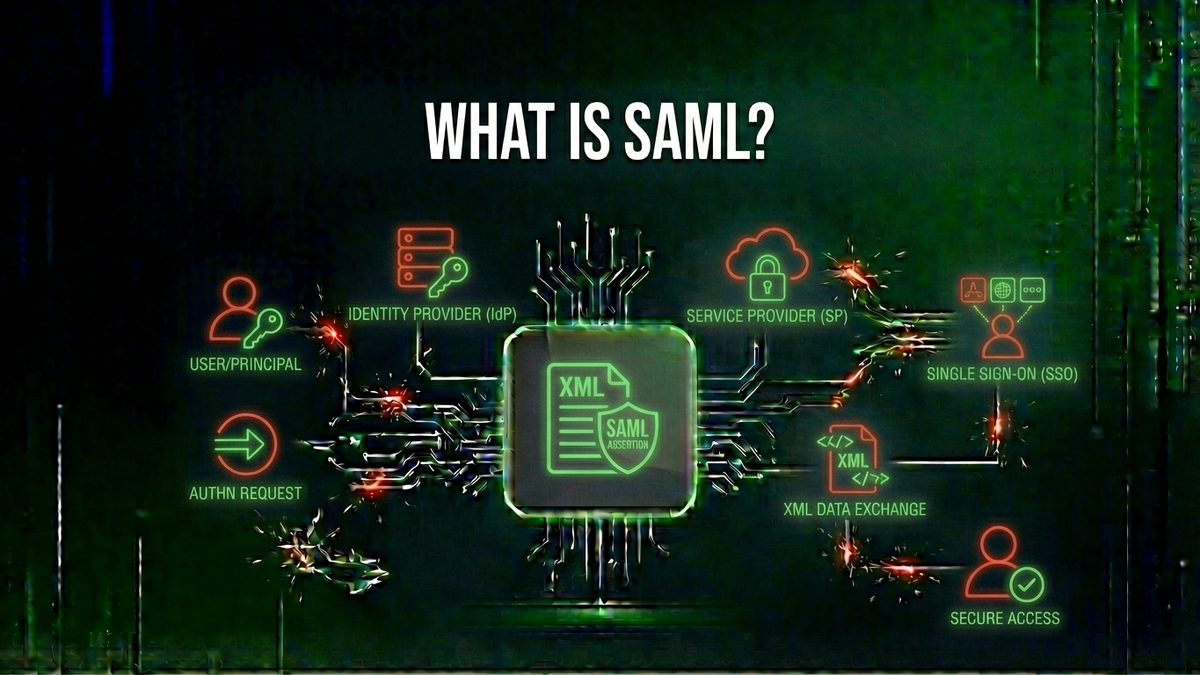
SAML (Security Assertion Markup Language) is an open standard for exchanging authentication and authorization data between parties—specifically, between an identity provider (IdP) and a service provider (SP). Developed by OASIS (Organization for the Advancement of Structured Information Standards), SAML allows users to authenticate once with an identity provider and then access multiple service providers without needing to log in again.
Think of SAML as a digital passport system. When you travel internationally, your passport—issued by your home country (the identity provider)—proves your identity to foreign countries (service providers). The foreign country trusts your passport because they trust the issuing country's verification process. Similarly, SAML assertions serve as digital credentials that service providers trust because they trust the identity provider that issued them.
SAML 2.0, released in 2005, is the current version and remains widely deployed across enterprises worldwide. It is used by major identity providers including Microsoft Entra IDMicrosoft Entra ID🛡️Microsoft's cloud-based identity and access management service (formerly Azure Active Directory), providing authentication, SSO, and security features for Microsoft 365Microsoft 365🌐Microsoft's subscription-based cloud productivity suite including Office applications, Exchange Online, SharePoint, and Teams. and other applications. (formerly Azure AD), Okta, Ping Identity, and OneLogin, as well as countless enterprise applications and security products like Fortinet's FortiCloud SSO.
Key SAML Components
Understanding SAML requires familiarity with its core components. Each plays a specific role in the authentication process.
Identity Provider (IdP)
The Identity Provider is the authoritative source for user authentication. It maintains user credentials, performs authentication when users log in, and issues SAML assertions confirming successful authentication. Examples include Microsoft Entra ID, Okta, Google Workspace, and on-premises solutions like Active Directory Federation Services (ADFS). In the Fortinet context, FortiCloud acts as an identity provider for FortiCloud SSO.
Service Provider (SP)
The Service Provider is the application or service that users want to access. It relies on the Identity Provider to authenticate users rather than managing credentials itself. When configured for SAML SSO, the service provider accepts SAML assertions as proof of authentication. FortiOS firewalls, FortiWeb, and other Fortinet products act as service providers when using FortiCloud SSO.
SAML AssertionSAML Assertion📖An XML document issued by an identity provider containing statements about a user's identity, attributes, and authentication status, used to grant access to service providers in SSO systems.
A SAML assertion is an XML document that contains statements about a user's identity and attributes. It is the core data structure that carries authentication information from the identity provider to the service provider. Assertions contain three types of statements:
Digital Signature
SAML assertions are protected by digital signatures to ensure integrity and authenticity. The identity provider signs assertions using its private key, and service providers verify the signature using the IdP's public key. This cryptographic signatureCryptographic Signature📖A mathematical scheme that uses public key cryptography to verify the authenticity and integrity of digital data, ensuring the content has not been altered and was created by the claimed sender. is what prevents attackers from forging assertions—when this verification fails or is improperly implemented, as in the Fortinet CVE-2025-59718 and CVE-2025-59719 vulnerabilities, authentication bypass becomes possible.
How SAML Authentication Works
The SAML authentication process involves a series of exchanges between the user's browser, the identity provider, and the service provider. Understanding this flow is crucial for both implementing SAML correctly and understanding where security vulnerabilities can occur.
SP-Initiated SSO Flow
In the most common scenario, the user attempts to access a service provider directly:
IdP-Initiated SSO Flow
In IdP-initiated SSO, the user starts at the identity provider portal (like an enterprise dashboard) and clicks a link to access a service provider. The IdP immediately generates a SAML assertion and posts it to the SP, skipping the request phase. While simpler, this flow has additional security considerations because there is no request-response binding to validate.
The Critical Role of Cryptographic Signatures
The security of SAML fundamentally depends on cryptographic signatures. When the identity provider creates a SAML assertion, it computes a digital signature using its private key. This signature serves two critical purposes:
XML Digital Signatures
SAML uses XML Digital Signatures (XML-DSig), a W3C standard for signing XML documents. The signature is embedded within the SAML assertion itself. However, XML-DSig is notoriously complex and easy to implement incorrectly. The signature verification process must:
What Happens When Signature Validation Fails
The Fortinet vulnerabilities CVE-2025-59718 and CVE-2025-59719 are examples of what happens when signature verification is flawed. In these cases, the cryptographic signature validation of SAML messages had implementation errors that allowed attackers to craft malicious assertions that the system would accept as legitimate. Without proper signature verification, an attacker can create an assertion claiming to be any user—including administrators—and the service provider will grant access.
Common SAML Security Vulnerabilities
SAML's complexity has led to numerous security vulnerabilities over the years. Understanding these common issues helps organizations evaluate their SAML implementations and respond to security advisories.
Signature Wrapping Attacks
XML Signature Wrapping (XSW) attacks exploitExploit🛡️Code or technique that takes advantage of a vulnerability to cause unintended behavior, such as gaining unauthorized access. the flexibility of XML document structure. An attacker takes a legitimately signed assertion, moves it to a different location in the XML document, and adds malicious content where the original assertion was. If the service provider verifies the signature but then processes the wrong (unsigned) content, the attacker achieves authentication bypass. Multiple variants of this attack have affected major SAML implementations.
XML Injection
If user-controlled data is incorporated into SAML assertions without proper sanitization, attackers may be able to inject additional XML elements that alter the assertion's meaning. This can lead to privilege escalationPrivilege Escalation🛡️An attack technique where an adversary gains elevated access rights beyond what was initially granted. if attackers can inject attributes granting additional permissions.
Replay Attacks
If an attacker captures a valid SAML assertion, they may be able to replay it to gain access. Proper implementations prevent this by checking assertion timestamps (NotBefore and NotOnOrAfter conditions), tracking assertion IDs to prevent reuse, and using HTTPS to prevent interception.
Comment Injection
Some SAML implementations have been vulnerable to attacks where XML comments are used to manipulate how the assertion is interpreted. For example, placing a comment in the middle of a username (user The REOLINK 4K PoE security system delivers 8MP clarity, smart person/vehicle detection, 24/7 recording with 4TB storage, and plug-and-play installation for comprehensive home surveillance. The Ring Outdoor Cam Pro delivers Retinal 4K video, 10x enhanced zoom, Low-Light Sight for true color night vision, and radar-powered 3D motion detection for precise security alerts. Cisco Duo delivers robust multi-factor authentication with one of the smoothest user experiences in the enterprise MFA space. While pricing can escalate quickly for larger teams, its device trust and adaptive policies make it a solid choice for security-conscious organizations.
Related Reviews
REOLINK 4K Security Camera System Review: Professional PoE Surveillance at DIY Prices
Ring Outdoor Cam Pro Review: 4K Security Camera with Radar-Powered Motion Detection
Cisco Duo Review: Enterprise MFA Made Simple